Thursday, February 17, 2011

C# MVP sessions schedule in Global Summit 2011

Hi All,

During MVP Global Summit 2011 that will be held from 28th Feb to 3rd March 2011, MVPs will present MVP 2 MVP side sessions during the summit days. Please check out the C# MVP side sessions schedule:

They will take place in 92/2310-Utopia (C#).

Start

Speaker

Topic

2:00 PM

Rob Vetter

Entity Framework 360: Code-Only Approach

2:20 PM

Al Pascual

Visual your data with maps.

2:40 PM

Chris Woodruff

Create an OData feed in 10 minutes

3:00 PM

D'Arcy Lussier

Using FitNesse with C#

3:20 PM

Mezil Matthieu

WF Dynamic hosting

3:40 PM

Mostafa Elzoghbi

Build cloud based solutions in Windows Azure

4:00 PM

Peter Richie

A lap around Mighty Mouse

4:20 PM

Sergey Barskiy

Testing Silverlight Applications with Silverlight Unit Test Framework

4:40 PM

Gary Short

Credit Crunch Code – Paying Back the Technical Debt

5:00 PM

Jason Bock

Evolving .NET

5:20 PM

Paul Litwin

How to speak at DevConnections


Hope this helps and see you all there.


Regards,
Mostafa Arafatwitter.com/mostafaelzoghbi

Wednesday, February 16, 2011

Unhandled exception : The file attached is not valid file error

Hi,

If you are using the Async file uploader control in AJAX Toolkit inside an update panel. when you select a file to upload, after selection, the file uploader control will be showing with Red background in the text field.

The fix for this problem is: click on the properties of the async file uploader control -> find ClientIDMode property -> change it from inherit to Auto ID.

Now try to build your web app. and select a file, The control will show the selected file with green background which means it is a valid input file validation being done by the control itself.

Enjoy !!!


Regards,Mostafa Arafa
twitter.com/mostafaelzoghbi

Thursday, January 13, 2011

Error when accessing XML Web service hosted in Windows Azure

Hi Folks,

I was developing a web role and i have a XML web service in my web role, I created a client application to access this web service. the client works on my development fabric. but after i deployed the web role in windows azure, I wasn't able to access the web service in the app fabric and i was getting this error:

{"A connection attempt failed because the connected party did not properly respond after a period of time, or established connection failed because connected host has failed to respond MYAPP_IP:20000"}

The problem is the App Fabric doesn't allow any inbound http connections to any role in the App Fabric unless you specify an endpoint in the service definition file.

So, the solution is to define an endpoint in the service definition file with the port specified in the web role.

To do this:

1) From VS 2010 -> Right click on the role

2) Click on Endpoints from the role properties left tab and add your End Point:

Name: HTTPInWS Protocol: Http Port: 20000

3) Build and publish your web role.

5) Add a web reference in your client application and try to consume the web service.

You will be able to access XML web service function with no errors.

Note: You have to have Azure SDK V1.3 at least to define more than endpoint in your cloud role.

Hope this helps.

Regards,
Mostafa Arafa
twitter.com/mostafaelzoghbi

Tuesday, January 04, 2011

LoggedOut Event is not firing in the Login Control

Hi Folks,
Happy New Year 2011, This is my first post in this year. Hope everyone will have happy and promising year.
In this post i'm showing an issue i faced when i was working with the login control in ASP.NET.
Problem:
If you tried to write code to clean up some resources when you log out from your asp.net application and you had an issue that the LoggedOut event handler is not firing.
Resolution:
Check the properties of your login control and if the Logout Action property is not set to Refresh, You need to update this property and set it to Refresh then your loggedout event will be handled.
I had the logout action property to redirect and that's why the loggedout event handler wasn't called in my code.

Hope this helps.
Regards,
Mostafa Arafatwitter.com/mostafaelzoghbi

Friday, December 17, 2010

FIX IT: ASP.NET 4.0 registration problem after enabling WCF activation feature in IIS 7

Hi,
If you recently enable WCF HTTP Activation Feature in IIS 7, you might face this prolem when you try to navigate to your WCF service that is targeting .Net Framework 4.0:

Could not load type 'System.ServiceModel.Activation.HttpModule' from assembly 'System.ServiceModel, Version=3.0.0.0, Culture=neutral, PublicKeyToken=b77a5c561934e089'.

To fix it:
1) Open VS Command Prompt.
2) Type the following command to re-install ASP.NET 4.0 and register the right .NET Framework.
aspnet_regiis.exe -iru
3) Refresh your WCF host url, it works :)

Hope this helps.
Regards,
Mostafa Arafa
twitter.com/mostafaelzoghbi

FIX IT: HTTP 404 Not Found problem when deploying WCF in IIS 7.0

Hi Folks,

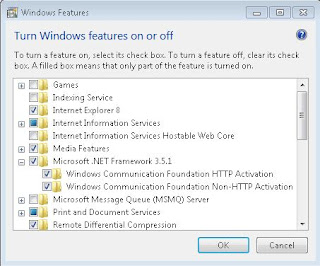
I was developing a WCF syndication service to be deployed on Windows Azure, I faced a problem that when you deploy the WCF service in IIS 7.0 it doesn't work and gives the following error in the browser: HTTP 404 Not Found. I checked the deployed service it contains the dlls and configuration files. After few minutes i figured out that the problem is in one of IIS features is not enabled which is the WCF activation feature.


To fix this problem:


1) Open control panel.


2) Select programs.


3) Select Turn on/Off windows Features.


4) Look for Microsoft .Net Framework 3.5.1


5) Check WCF HTTP Activation and Non Activation check boxes (BOTH).


6) Click ok.

7) Now your IIS is configured to host WCF services with HTTP activation and non HTTP Activation requests.
Hope this helps.
Happy New Year :)

Regards,
Mostafa Arafa
twitter.com/mostafaelzoghbi

Tuesday, November 30, 2010

Announcing New Bing maps AJAX toolkit

Hi All,

New Bing Maps AJAX control has been announced to be used on your applications. This version has been developed from the ground up to be faster and more efficient than the previous version.

Today on the Bing Maps Blog we announced the release of the new Bing™ Maps AJAX Control 7.0-our flagship for the desktop and mobile web. We built it from the ground up to be agile and fast, and it shows: at launch, the control is less than one-third the size of our previous AJAX Control 6.3 and renders multiple points nearly three times faster.*

Bing Maps Control ver. 7 :

http://msdn.microsoft.com/en-us/library/gg427610.aspx


Help in CHM or PDF format:

http://www.microsoft.com/downloads/en/details.aspx?FamilyID=4a8e5de3-51af-40c3-b35d-d5e91da2effa&displaylang=en

http://www.microsoft.com/downloads/en/details.aspx?FamilyID=9477f0fd-da1d-4822-bb67-de4cda7c7895&displaylang=en


Bing Map control is being used on your application to visualize your location based information.

Hope this helps.

Regards,Mostafa Arafa

twitter.com/mostafaelzoghbi

Thursday, October 28, 2010

Integrate External SharePoint 2010 List to Outlook 2010

Hi All,

A friend of mine asked for how to integrate SharePoint 2010 external list that is configured to pull information from an external system into outlook 2010.

So, To begin the office 2010 has unique and enhanced integration with sharepoint 2010, If you are able to configure SharePoint 2010 to pull data from external data using BCS Exteranl List. You will be able to manage this list in outlook 2010.

First, When you create external list that is designed to be used in outlook the ECT ( Exteranl Content Type ) has to be with type Office item type and select from the options: Task, Post, Appointment or contact.

How to connect to external list using SPD:
1) Open SPD with the SP site.
2) Select External content type and click on External content type from the ribbon.
3) Type the ECT name and select the office item type from the list.
4) select the data source and do the mapping.
5) Note: You have to map the fields to the appropriate office mapping.
6) Save your ECT and click on Create Lists and Form from the ribbon.
7) Now you have the ECT and the list in the SharePoint Site.
8) Before test the list, set the permission to the External list from the central admin -> application management -> application services -> select BCS -> select your list and click on set permissions - > provide the required permissions per user.
9) Visit your SP site and click on lists link and select your list to check it.

Note: I went through how to create ECT and External List in SP 2010. There is more tips and security best practices for above items - Please check MSDN how to setup BCS with SSS service.

How to get the created external list on your outlook ?
1) Select your list.
2) Select List tab and click on connect to outlook.
3) an Add-In will be installed and configured to your outlook 2010 to the list.

Now, You will be able to manage the list once the configuration is done and outlook will be launched automatically once SP 2010 is done with the configuration.


Another Question: How can i change the mapping for the created ECT ?
The only thing you need to do is to open SPD and select your ECT - > Read Item and then click on Edit Operation from the ribbon and change the ECT field mapping and save it.

Tip: if you have your outlook 2010 is opened, and you right click on the contact list and run the sync option you won't be able to get the new mapping fields. Close the outlook and open it again.


Hope this helps.

Regards,
Mostafa Arafa
twitter.com/mostafaelzoghbi

Wednesday, October 20, 2010

Avoid Run Time Errors while deploying SharePoint 2010 Solutions

Hi All,

Through my discussions with developers and attendees in SharePoint Events, I was getting a lot of questions about the target .net framework for applications and solutions that are built against Server and Client Object Model in SharePoint 2010.

I decided to list the things you need to take care and set before start compiling and deploying your solutions and getting runtime errors using SharePoint object model.

1) If you are developing a SharePoint 2010 Solutions. You solution has to target .NET Framework 3.5 Only and Not 4.0.

2) Also, if you build your solutions as layers and you have different projects ( Non SharePoint Project) all are used within your SharePoint project, ALL OF THEM HAVE TO TARGET .NET FRAMEWORK 3.5 as well.

3) Your target CPU platform can't be x86. Even if you are building a console application using the client object model. The Solution ? Next Point.

4) It's recommended that all your projects to target Any CPU platform, You can't have some projects are targeting x86 ( Such as Console Application ) that are referencing x64 CPU platform.

5) You have the option "Less Recommended" to target all your project to x64. but in this case your solution will not be able to run on x86 machines. Instead, Select Any CPU platform as recommended on Point 4.

6) If you made all your projects to target Any CPU, the only point you have to put in your consideration is the file size for your solution will be bigger than if you target x64 CPU platform.

7) If you decided to enable x64 configuration, here is the steps you need to do in VS 2010 and the resource of this post:
http://msdn.microsoft.com/en-us/library/ff407621.aspx


Hope this helps.


Regards,Mostafa Arafa
twitter.com/mostafaelzoghbi

Saturday, October 16, 2010

Sandbox Solutions in SharePoint 2010

Hi All,

Today i was presenting in SharePoint Saturday DC Federal and the event was hosted in Booz Allen Hamilton in McLean,VA.

I enjoyed the questions from Devs,Architects and attendees. It was really awesome meeting you all. The questions were primarily for secured sandbox solutions which are important for the federal employees and secured environments.


In this session i covered the following topics:
1) Sandbox overview.
2) Sandbox life cycle.
3) Developing and Deploying Sandbox solutions.
4) Custom workflow actions in workflow.
5) Custom Validator.
6) Resource Management.
7) Blocking Sandbox Solutions.
8) Points to metrics equation and how to convert points to different units.

And more...


Presentation url:
http://cid-4bc94054914a6469.office.live.com/self.aspx/SharePoint%20DC%20Federal/Sandbox%20Solutions%20In%20SharePoint%202010.pptx

Demos url:
http://cid-4bc94054914a6469.office.live.com/self.aspx/Blog%20Code/SPSDCFederal.zip

Hope this helps.


Regards,Mostafa Arafa
twitter.com/mostafaelzoghbi

Sunday, October 10, 2010

My session in Richmond Code Camp - SharePoint Development using VS 2010

Hi All,

Saturday 9th October we had a code camp in Richmond, Virginia. The Code Camp was full of new and challenging topics: Windows 7 Mobile Development, Windows Azure Development, Silverlight, WCF Data Services and JQuery and set of other topics.

My session was talking about SharePoint 2010 Development using VS 2010. In this session I covered set of great tools in VS 2010 for SharePoint Developers such as:
Feature Designer, Package Designer, SharePoint Explorer, Feature Dependency, Mapped Folders, Deployment Options and Activation steps.

The presentation has been uploaded:
http://cid-4bc94054914a6469.office.live.com/self.aspx/Richmond%20Code%20Camp/SharePoint%202010%20Development%20-%20Richmond%20Code%20Camp.pptx


Feel free to share it and use it with developers and community talks.


Regards,Mostafa Arafa
twitter.com/mostafaelzoghbi

Friday, October 01, 2010

Generate machineKey for your web.config in .NET

Hi All,

We were implemeneting Single Sign-On for our enterprise ASP.NET applications, I have been asked: How can we generate our own machine keys in our asp.net web.config ? Here is the console application you need to run and to get a random key based on the length you need and then add it to your web.config.

C# Code:

static void Main(string[] keyLength)
{

int len = 128;
if (keyLength.Length > 0)
len = int.Parse(keyLength[0]);
byte[] buff = new byte[len / 2];
RNGCryptoServiceProvider rng = new
RNGCryptoServiceProvider();
rng.GetBytes(buff);
StringBuilder sb = new StringBuilder(len);
for (int i = 0; i < buff.Length; i++)
sb.Append(string.Format("{0:X2}", buff[i]));
Console.WriteLine(sb);

}

If you didn't pass anything to this method will generate 128 character key (64 byte), If you want to get 32 byte key, you need to pass 64 as key length input.

If you are trying different cryptography algorithms provided by System.Cryptography namespace in .NET Framework so here is the reference you need to read for what is the required length for each algorithm ? either if you are using: DES,3DES,AES,SHA1...etc.

http://msdn.microsoft.com/en-us/library/w8h3skw9.aspx

Hope this helps.


Regards,Mostafa Arafa
twitter.com/mostafaelzoghbi

Thursday, September 30, 2010

Why do we need managed accounts in SharePoint 2010 ?

Hi All,

SharePoint 2010 shipped with a new feature called "Managed Accounts". Managed accounts is a feature that allow sharepoint farm admins and system engineers to manage service accounts/Services created for the sharepoint 2010.

For Example: you might need a service account for your application pool or different accounts for the Sandbox solutions in SharePoint. So, You have to keep those service accounts with their password in a secured file in your system. If the password for one of those accounts has been changed, the result of this your service account will stop functioning.

The solution for this comes with SharePoint 2010 that you can register your service accounts as a Managed Accounts, and you don't need then to remember the password once you register them in your farm. and also the sharepoint 2010 will take care of the password expiry policy that you have in your organization by creating a new strong password and notify you as well. At the same time you can change the managed accounts that manage the service applications/services from the central administration.

How can i register a service account in my far ? here are the steps:
1) Open Central administration.
2) Select security.
3) Select Managed accounts.
4) Type your domain username and password you would like to register.
username: DOMAINNAME\USERNAME
password: ACCOUNTPASSWORD

5) Optional, configure SharePoint to notify you if you have password expiry policy by creating new password.

Tip: This is a good practice to enable SharePoint to generate the password for you and send a notification to you. Even if you are working in an organziation with high password requirement's policy in there, you can let SharePoint change it for you automatically to keep your environment secure and you can change it after that as well.

Once you register your managed accounts in your farm, you can then change those managed accounts to different service applications in SharePoint.

How can i change the service accounts for SharePoint services?
1) Open Central Administration.
2) Select Security.
3) Select Manage Service Accounts.
4) Select the service application and the required managed account.

Tip: Once you select the service application, you will be able to assign to any managed account in your farm.

Summary: It's recomended to create your managed accounts and use it across your farm without the need to remember the password for your accounts.

Hope this helps.


Regards,
Mostafa Arafa
twitter.com/mostafaelzoghbi

Monday, September 27, 2010

Create Reports by Business users and deploy it to SharePoint 2010

Hi All,

Usually the business users are trying to create reports for their backend DBs. You can build your own Report and deploy it to SharePoint 2010.

Without using VS.NET you can develop and create your reports using FREE Reporting tool called "Report Builder". In this tool, You can connect to your DB and build your report.

To Download SQL 2008 R2 Report Builder tool, Here is the link:
http://www.microsoft.com/downloads/en/details.aspx?FamilyID=d3173a87-7c0d-40cc-a408-3d1a43ae4e33&displaylang=en

Once you have "SQL 2008 R2 Report Builder 3.0" tool, You can connect to your DB and you will be able to create Charts and Reports.

Once you are done, You can deploy the report by saving it locally "*.rdl" then from sharepoint Document library with Report Builder content type, You just need to upload the rdl file to the document libarary and once you click on the report you will be able to see it.

TO create the document libaray with Report builder content type, check this blog post:
http://dinesql.blogspot.com/2010/06/configuring-reporting-services-2008-r2_07.html

Once you create the document, Just upload the rdl to your Document library.

If your farm is not configured to allow SSRS reports in SharePoint 2010, read this blog:
http://moustafa-arafa.blogspot.com/2010/06/how-to-configure-reporting-services.html


Enjoy...

Regards,Mostafa Arafa
twitter.com/mostafaelzoghbi

Monday, September 20, 2010

TFS 2010 and Project Server 2010 Get Started

Hi All,

One of my colleagues asked me for useful links of TFS 2010 : Get started and training materials and Project Server 2010. Kindly find below links:

1) TFS 2010:
Homepage for all required materials for TFS 2010: Features, Training Kits, Installation and requirements management..etc:
http://msdn.microsoft.com/en-us/vstudio/ff637362.aspx

Administration and installation guide for TFS 2010:
http://www.microsoft.com/downloads/en/details.aspx?displaylang=en&FamilyID=2d531219-2c39-4c69-88ef-f5ae6ac18c9f

Supplemental guide for TFS 2010 - CodePlex:
http://vs2010upgradeguide.codeplex.com/

2) Project Server 2010:
Get Started with Project Server 2010: Articles and Video series
http://blogs.msdn.com/b/chrisfie/archive/2010/05/26/microsoft-project-and-project-server-2010-end-user-help-documentation.aspx

Instructor-Led training and Course Training
http://www.microsoft.com/project/en/us/train-learn.aspx

Microsoft Project server: Features, Project Life cycle management + blogs
http://technet.microsoft.com/en-us/projectserver/default.aspx

Hope this helps.


Regards,Mostafa Arafa
twitter.com/mostafaelzoghbi

Thursday, September 16, 2010

SharePoint Governance Tip: Manage Self Site Creation Service and un used sites in your farm

Hi All,

I was implementing Site Creation governance practices, and i came out with the idea of this post, and I'd like to share 2 governance tips:

1) Self Site Creation Service: It is a SharePoint 2010 service that allow users to create sub sites within their site collections.

To configure Self Site Creation (SSC)Service:
Note: By Default is service is off on your web application.
1. Open SharePoint Central administration.
2. Click on Application Management Tab.
3. Under Site Collection, Click on Configure Self-Site Creation service.
4. Select your web application and select "On" from the choice option.
5. Check "Require secondary contact" to force the user to add another user to be a site administrator other than himself.

Note: When any admin clicks on OK button, A new item will be added to the announcement list of the top level site.

As a user, try to go to the top level site and click on lists and select Announcements. and you will find a new entry has been added, Try to open it, The item will have this url for users:
http://PORTALURL/_layouts/scsignup.aspx

This is the page that any site user can create a new site within the site collection.

** You can manage the SSC service using the stsadm tool:
Enable SSC serivce:
stsadm.exe -o enablessc -url -requiresecondarycontact
Disable SSC service:
stsadm -o disablessc -url


2) As a SharePoint Farm Admin if you enable this service, the next question will be:
How can i remove or take an action for un used sites? This answer is: by configure "Confirm site use and deletion":
1) Open Central Administration.
2) Select your Web Application.
3) Check the box to send email notifications after specific # of Days let's say : 60 Days
4) Specify the duration that you need backend timer serivce to check for the existing created sites: Preferred to be Daily and you can select any time as per your policy.
5) You can check to delete all site content if the site use wasn't confirmed by the site admin after specific # of notifications. (Option)

After you configure Site use confirmation and deletion you will be able to manage and monitor your site collection activities and # of sites and keep your farm operates with good performance by managing # of sites hosted on your farm.

If you are looking for a template document for site creation and maintanance sheet, check this link: http://go.microsoft.com/fwlink/?LinkId=193521

Hope this helps...

Reference:
- stsadm to manage ssc service:
http://technet.microsoft.com/en-us/library/cc261685.aspx

Regards,
Mostafa Arafa
twitter.com/mostafaelzoghbi

Tuesday, September 14, 2010

Bing Maps troubleshooting WCF services: Geocode Service

Hi All,

I was developing a WCF service that consume Bing Maps Geocode Serivce, and when i was trying to create an object from the geocodeservice, i was getting this error :

{"An endpoint configuration section for contract 'GeocodeService.IGeocodeService' could not be loaded because more than one endpoint configuration for that contract was found. Please indicate the preferred endpoint configuration section by name."}

C# Code for creating a Geocode service object:

GeocodeServiceClient geocodeService = new GeocodeServiceClient();

This is beacause i have more than endpooint for my service, please check your Web.Config or the service configuration file if your WCF is not hosted within web application. You will find at least 2 endpoints are defined for your service, To fix the problem :

1) Either to remove one of the endpoints definition.
2) Keep all endpoints and select which endpoint you want to use in your code - This is the preferred solution.

C# Code for the fix : 2nd option


GeocodeServiceClient geocodeService = new GeocodeServiceClient("BasicHttpBinding_IGeocodeService");

I selected the basic HTTP binding for my service. and you can select any of your choice and you have to specify this in your code.

Hope this helps.


Regards,Mostafa Arafatwitter.com/mostafaelzoghbi

Sunday, September 05, 2010

System Services/ Service Applications in SharePoint 2010

Hi All,

In this post, I’d like to share some thoughts about SharePoint 2010 terms in regard of planning your SharePoint Farm. I will show in details the differences between some terms such as: System Services, Application Services, Cross-farm services, Single-farm services, Services associated or not to a service applications and How to configure each of them in your SharePoint Farm.
If you are familiar with SharePoint 2007, Service applications are the equivalent to Shared Services in SharePoint 2007.
1) System Services: In SP 2007, some common services were combined under Shared Services service (search, user profile…etc.), in SP 2010, each service is a standalone application, called Service Application. In SP 2010 you can configure each service application alone. Some of these system services are associated or not with a service application.
To configure System Services in SP 2010, follow these steps:
1) Open SP 2010 Central Admin
2) Select System settings
3) Click on Manage services on server
You will be able to select the servers within the farm and Start/Stop them
2) Web Application and system services: Once you create a web application in your farm, all system services are associated to your web application, You can configure which service application would you like to associate with your web application, to do so:
1) Open SP 2010 Central administration
2) Select Application Management
3) Click on Manage configure service application association
4) Click on your web application and select the required system services required
5) Select custom from the drop down list to start configure the system services associated with your web application

3) Cross-farm services vs. Single-farm services:
Cross-farm services: are the services that can be shared across different farms within the organization such as: User Profile, Managed Metadata, BCS, Search, SSS and Web Analytics.
Single-farm services: are the services that can be configured only within only one farm such as: State service, Master data services, Performance Point, Excel Services, Access Services, Word Services, Word Viewing, Power Point and Visio Service.


Regards,
Mostafa Arafa
twitter.com/mostafaelzoghbi

Wednesday, September 01, 2010

How can you deploy Windows LIVE Project Template on Azure

Hi All,

If you are developing windows live application using Window Live SDK June CTP, You won't be able to deploy your windows live application on windows azure if you didn't update your web.config by adding the following section: diagnostics.

PROBLEM: You won't be able to view any page in your web role project, and you will get a blank page.

CAUSE: Missing web.config section needs to be set on the Windows Live Project Template in VS 2010

To add this section do the following:
1) Create a new web role project in your solution.
2) Open web.config file.
3) Copy the section system.diagnostics and add it in your windows live application.
You will notice that you don't have this section on your windows live application.

4) Note: MAKE SURE THAT YOU DON'T HAVE DUPLICATE ENTRIES ON WEB.CONFIG for OAuthWrapCallback.ashx HTTP HANDLER.

5) Note: Try to update your host file by commenting the entry you have added, so when you deploy it you will be able to use the deployed url and not the host file entry that points to the localhost 127.0.0.1


Try to run the cloud service now and you will be able to view the default page of your web role.

This blog post is a result summary from my MSDN thread below:
http://social.msdn.microsoft.com/Forums/en-US/netservices/thread/cc7d0a30-a12f-4280-acbb-ed77f405acd6/

To download Windows Live SDK - June CTP for VS 2010:
http://www.microsoft.com/downloads/details.aspx?FamilyID=7fdf2281-3ee4-466a-a68f-ac71d47d6620&displaylang=en


Hope this helps.

Regards,
Mostafa Arafa
twitter.com/mostafaelzoghbi

Thursday, August 26, 2010

Troubleshooting Cloud Service Deployment in Azure

Hi All,

I was working on last few days to deploy a sitefinity CMS website to the cloud on Windows Azure. I faced different problems and stop points while trying to deploy my Cloud service to Azure.

In this post i will share the main check points that you have to go through before start deploying you application to the cloud, since if you tried to deploy your application and you were getting either runtime errors or you can't start your service on the cloud or any other problems you might face because of missing files or verification points you have to do on your development fabric environment before deploy to the cloud.

1) Make sure that web worker role is compiled with no errors on your development machine.

2) Make sure that all custom DLLs that you have reference for are copied to the output file, To do this, right click on all your custom or third party dlls and open properties window and select Copy to output directory to COPY ALWAYS.

3) Run your service and make sure that you are not getting any runtime errors on the development fabric -Local before start deploying.

4) If you published your service, and when you are trying to start it, it keep stopping, this means there's a problem on your service package file.

5) If you are having any problem starting your cloud service, Install this tool (IntelliTrace) on your Visual studio 2010 Ultimate edition.
http://blogs.msdn.com/b/jnak/archive/2010/05/27/using-intellitrace-to-debug-windows-azure-cloud-services.aspx

6) If you face any problem, from Azure web portal, you can submit support ticket for your problem, the tip is include your subscription Id and Deployment Id on your ticket to get fast and reasonable resolution with analysis.

7) If you are using VS2010, Use Server explorer to navigate through your azure account components.

8) Using SQL 2008 R2, Script the DB ( Schema + Data ) and then connect to the SQL AZURE using SQL Server Management Studio.

9) IMPORTANT: Before deploying your website, make sure to update the web.config to point to the SQL Azure DB. If you miss this step, You might encounter a problem while deploying your web application when you try to start the application and the solution keep moving to stopped state because of trying to connect to the DB.

10) Advice: If you had the problem of your application keeps moving to the stop state, what you need to do is to submit a ticket to the support team and they will be able to check your VM event log and guide you to fix it since they are a lot of parameters to look at when you deploy.


Hope this helps.


Regards,
Mostafa Arafa
twitter.com/mostafaelzoghbi