Hi Folks,
If you got the error message from MS CRM 4.0 which is running on a VM on your test or production Hyper-V manager server, After i checked the the error message on the server, the error message which was :
"'AntiXssLibrary' or one of its dependencies. There is not enough space on the disk. (Exception from HRESULT: 0x80070070)"
Just trun off your VM, Then expand desk space allocated for the VM will fix the issue.
Hope this tip helps.
Regards,
Mostafa arafa
Wednesday, September 30, 2009


Monday, September 28, 2009
Access denied when try to sign your project in VS 2008
Hi Folks,
If you are facing a problem that you can't sign your project using VS 2008, this is not because there is a problem in VS 2008 but this is because the User Access control (UAC) feature in Vista. The User Access Control enabled in your system, you have to disable it to enable signing to your assembly in VS 2008.
OR
If you can't publish your project using ClickOnce deployment in VS 2008 and your are getting an error message : "publish aborted, can't create a default certificate"
The cause for above 2 errors messages are because of the UAC is enabled.
To do/fix this:
1) Open Run windows in Vista: Accessories -> Run.
2) Type MSCONFIG command.
3) select tools tab, select Disable UAC and click on Luanch button.
4) Reboot your system (Important).
Once you reboot your system, open your project and you will be able to sign your assembly.
Hope it helps.
Regards,
Mostafa arafa
If you are facing a problem that you can't sign your project using VS 2008, this is not because there is a problem in VS 2008 but this is because the User Access control (UAC) feature in Vista. The User Access Control enabled in your system, you have to disable it to enable signing to your assembly in VS 2008.
OR
If you can't publish your project using ClickOnce deployment in VS 2008 and your are getting an error message : "publish aborted, can't create a default certificate"
The cause for above 2 errors messages are because of the UAC is enabled.
To do/fix this:
1) Open Run windows in Vista: Accessories -> Run.
2) Type MSCONFIG command.
3) select tools tab, select Disable UAC and click on Luanch button.
4) Reboot your system (Important).
Once you reboot your system, open your project and you will be able to sign your assembly.
Hope it helps.
Regards,
Mostafa arafa
Wednesday, September 23, 2009
My first SQL azure Application on the Cloud !!!
Hi Folks,
Few months ago, i worked with Azure Services, and since i'm interested to develop applications over the cloud which extensively use SQL Server as a backend, i used BLOBS to store my data... actually it wasn't that easy to use, but the product was still in beta in that time.
Recently, I have some time to develop and start using SQL Azure services, A big start by allowing us to create the Database over the website, then all other operations ( CRUD ) for the Database design and object model can be done using ADO.Net classes.
C# Code for connecting and creating a table over the cloud:
SqlConnectionStringBuilder connString2Builder;
connString2Builder = new SqlConnectionStringBuilder();
connString2Builder.DataSource = "MyServer.ctp.database.windows.net"; // check your profile to know server name.
connString2Builder.InitialCatalog = "YourDB"; // you can create your own their.
connString2Builder.Encrypt = true;
connString2Builder.TrustServerCertificate = true;
connString2Builder.UserID = "myUserName";
connString2Builder.Password = "myPassword";
// Connect to the sample database and perform various operations
using (SqlConnection conn = new SqlConnection(connString2Builder.ToString()))
{
using (SqlCommand command = conn.CreateCommand())
{
conn.Open();
// Create a table
command.CommandText = "CREATE TABLE MostafaTable(Col1 int primary key, Col2 varchar(20))";
command.ExecuteNonQuery();
// Insert sample records
command.CommandText = "INSERT INTO MostafaTable(col1, col2) values (1, 'string 1'), (2, 'string 2'), (3, 'string 3')";
int rowsAdded = command.ExecuteNonQuery();
// Query the table and print the results
command.CommandText = "SELECT * FROM MostafaTable";
using (SqlDataReader reader = command.ExecuteReader())
{
// Loop over the results
while (reader.Read())
{
Console.WriteLine("Col1: {0}, Col2: {1}",
reader["Col1"].ToString().Trim(),
reader["Col2"].ToString().Trim());
}
}
}
}
-- To read more about SQL Azure services:
http://msdn.microsoft.com/en-us/library/ee336279.aspx
-- SQL Azure Forums:
http://social.msdn.microsoft.com/forums/en-US/ssdsgetstarted/threads/
Hope it helps.
Regards,
Mostafa arafa
Few months ago, i worked with Azure Services, and since i'm interested to develop applications over the cloud which extensively use SQL Server as a backend, i used BLOBS to store my data... actually it wasn't that easy to use, but the product was still in beta in that time.
Recently, I have some time to develop and start using SQL Azure services, A big start by allowing us to create the Database over the website, then all other operations ( CRUD ) for the Database design and object model can be done using ADO.Net classes.
C# Code for connecting and creating a table over the cloud:
SqlConnectionStringBuilder connString2Builder;
connString2Builder = new SqlConnectionStringBuilder();
connString2Builder.DataSource = "MyServer.ctp.database.windows.net"; // check your profile to know server name.
connString2Builder.InitialCatalog = "YourDB"; // you can create your own their.
connString2Builder.Encrypt = true;
connString2Builder.TrustServerCertificate = true;
connString2Builder.UserID = "myUserName";
connString2Builder.Password = "myPassword";
// Connect to the sample database and perform various operations
using (SqlConnection conn = new SqlConnection(connString2Builder.ToString()))
{
using (SqlCommand command = conn.CreateCommand())
{
conn.Open();
// Create a table
command.CommandText = "CREATE TABLE MostafaTable(Col1 int primary key, Col2 varchar(20))";
command.ExecuteNonQuery();
// Insert sample records
command.CommandText = "INSERT INTO MostafaTable(col1, col2) values (1, 'string 1'), (2, 'string 2'), (3, 'string 3')";
int rowsAdded = command.ExecuteNonQuery();
// Query the table and print the results
command.CommandText = "SELECT * FROM MostafaTable";
using (SqlDataReader reader = command.ExecuteReader())
{
// Loop over the results
while (reader.Read())
{
Console.WriteLine("Col1: {0}, Col2: {1}",
reader["Col1"].ToString().Trim(),
reader["Col2"].ToString().Trim());
}
}
}
}
-- To read more about SQL Azure services:
http://msdn.microsoft.com/en-us/library/ee336279.aspx
-- SQL Azure Forums:
http://social.msdn.microsoft.com/forums/en-US/ssdsgetstarted/threads/
Hope it helps.
Regards,
Mostafa arafa
Friday, September 18, 2009
SortedSet <T> new collection type in .Net 4.0 beta 1
Hi folks,
This post based on my readings in .Net 4.0 beta 1, one of the new enhancements in .Net 4.0 is SortedSet<T> collection type, which implements red-black sorting algorithm with complexity O(log n) for the entire list.
Red-Black tree is an efficient sorting algorithm and using this collection will help alot from performance of sorting large sets in the run time.
C# code:
var mySet=new SortedSet <int>() {3,2,7,23,12,879,345,122,98};
foreach(int x in mySet)
{
Console.WriteLine(x);
}
// output: sorted list.
To read more about .Net 4.0 enhancements, kindly check below links:
http://blogs.msdn.com/bclteam/archive/2009/05/22/what-s-new-in-the-bcl-in-net-4-beta-1-justin-van-patten.aspx
http://msdn.microsoft.com/en-us/netframework/dd819232.aspx
Hope this helps.
Regards,
Mostafa arafa
This post based on my readings in .Net 4.0 beta 1, one of the new enhancements in .Net 4.0 is SortedSet<T> collection type, which implements red-black sorting algorithm with complexity O(log n) for the entire list.
Red-Black tree is an efficient sorting algorithm and using this collection will help alot from performance of sorting large sets in the run time.
C# code:
var mySet=new SortedSet <int>() {3,2,7,23,12,879,345,122,98};
foreach(int x in mySet)
{
Console.WriteLine(x);
}
// output: sorted list.
To read more about .Net 4.0 enhancements, kindly check below links:
http://blogs.msdn.com/bclteam/archive/2009/05/22/what-s-new-in-the-bcl-in-net-4-beta-1-justin-van-patten.aspx
http://msdn.microsoft.com/en-us/netframework/dd819232.aspx
Hope this helps.
Regards,
Mostafa arafa
Saturday, September 12, 2009
CRM 4.0 Integration with your business applications/products
Hi Folks,
MS Dynamics - CRM 4.0 is one of the recognized products for mid-size, large customers for customers' relationship management products in the market.
If you have a CRM 4.0 in your company, you might want to integrate CRM Data with other business applications. The way to do this is to use MS Biztalk server which comes now with a CRM 4.0 Adapter.
This means that you can make use of CRM schema and Data using Biztalk 2006/2009 in your business applications or other products using this new released CRM adapter in Biztalk.
To download and start integrating with CRM 4.0, this is the download link and some useful documents to wotk with Biztalk CRM Adapter.
http://www.microsoft.com/downloads/details.aspx?FamilyID=ABD3BB9E-A59A-4EB6-8DE8-FB25B77926D7&displaylang=en
Hope this helps.
Regards,
Mostafa arafa
MS Dynamics - CRM 4.0 is one of the recognized products for mid-size, large customers for customers' relationship management products in the market.
If you have a CRM 4.0 in your company, you might want to integrate CRM Data with other business applications. The way to do this is to use MS Biztalk server which comes now with a CRM 4.0 Adapter.
This means that you can make use of CRM schema and Data using Biztalk 2006/2009 in your business applications or other products using this new released CRM adapter in Biztalk.
To download and start integrating with CRM 4.0, this is the download link and some useful documents to wotk with Biztalk CRM Adapter.
http://www.microsoft.com/downloads/details.aspx?FamilyID=ABD3BB9E-A59A-4EB6-8DE8-FB25B77926D7&displaylang=en
Hope this helps.
Regards,
Mostafa arafa
Sunday, September 06, 2009
Code for the power of Windows 7
Hi All,
Do you want to develop for the power of windows 7 ? Do you want to earn money for the submission you will do ? Competition is full of challenge and prizes.... deadline for registration is end of 10th october, Register now :
https://www.code7contest.com/
Start today with Windows 7 development.
Regards,
Mostafa arafa
Do you want to develop for the power of windows 7 ? Do you want to earn money for the submission you will do ? Competition is full of challenge and prizes.... deadline for registration is end of 10th october, Register now :
https://www.code7contest.com/
Start today with Windows 7 development.
Regards,
Mostafa arafa
Friday, September 04, 2009
"an item with the same key has already been added" on CRM 4.0
Hi Folks,
If you are experiencing this error on your CRM 4.0 instance, this means that your CRM 4.0 needs a hotfix to fix this problem.
The hotfix KB article:
http://support.microsoft.com/default.aspx/kb/949256
The error # : 951849
Hope it helps.
Regards,
Mostafa arafa
If you are experiencing this error on your CRM 4.0 instance, this means that your CRM 4.0 needs a hotfix to fix this problem.
The hotfix KB article:
http://support.microsoft.com/default.aspx/kb/949256
The error # : 951849
Hope it helps.
Regards,
Mostafa arafa
Tuesday, August 25, 2009
Add external sites to Sharepoint Search
Hi Folks,
One of the most imoportant features in sharepoint 2007 is the enterprise search. Enabling search for extenral sites are extermely needed in any organization specially if the organization has other sites hosted on other platforms other than sharepoint sites.
To implement this, First make sure that crawling services configuration are set properly on your sharepoint "SharedServices" assigned to your site that you are working on.
From Central Administration:
- Select SharedServices.
- Select crawl rules.
- click on new crawl rule.
- set the url of your site, select include all items in this path.
Then click ok, wait till the next crawl service will run or run it manually, then you will get search results.
Hope this helps.
Regards,
Mostafa arafa
One of the most imoportant features in sharepoint 2007 is the enterprise search. Enabling search for extenral sites are extermely needed in any organization specially if the organization has other sites hosted on other platforms other than sharepoint sites.
To implement this, First make sure that crawling services configuration are set properly on your sharepoint "SharedServices" assigned to your site that you are working on.
From Central Administration:
- Select SharedServices.
- Select crawl rules.
- click on new crawl rule.
- set the url of your site, select include all items in this path.
Then click ok, wait till the next crawl service will run or run it manually, then you will get search results.
Hope this helps.
Regards,
Mostafa arafa
Friday, August 21, 2009
Exception when implement function overloading in WCF
Hi Folks,
If you tried to develop a simple WCF function, and you tried to write in your WCF 2 overloading functions in WCF, you will not be able to deploy your serivce and the clients will get an exceptions.
The solution: give Aliases to the overloaded functions in the WCF service.
Code :
public interface IMyWCFSvc
{
[OperationContract(Name="GetCustomerById")]
string GetCustomerInfo( int CustId);
[OperationContract(Name="GetCustomerByEmail")]
string GetCustomerInfo( string CustomerEmail);
}
The proxy when you reference to your serivce, will create 2 methods with the Alias names and not with the actual overloaded name in C# code.
Hope this helps.
Regards,
Mostafa arafa
If you tried to develop a simple WCF function, and you tried to write in your WCF 2 overloading functions in WCF, you will not be able to deploy your serivce and the clients will get an exceptions.
The solution: give Aliases to the overloaded functions in the WCF service.
Code :
public interface IMyWCFSvc
{
[OperationContract(Name="GetCustomerById")]
string GetCustomerInfo( int CustId);
[OperationContract(Name="GetCustomerByEmail")]
string GetCustomerInfo( string CustomerEmail);
}
The proxy when you reference to your serivce, will create 2 methods with the Alias names and not with the actual overloaded name in C# code.
Hope this helps.
Regards,
Mostafa arafa
Wednesday, August 05, 2009
Service unavailable after changing the identity for a sharepoint site
Hi Folks,
If you try to change the identity for the applicaiton pool that the sharepoint site is running under, You can do this from the iis manager open identity tab and change the account for the application pool.
After you change this, you will get "Service Unavailable" error message when you try to open your sharepoint site, to fix this:
1) Make sure that you type the password for the service account which the application pool will run under correctly.
2) Make sure that the Service account is part of the following groups: IIS_WPG and STS_WPG .
3) Reset your IIS.......MOST IMPORTANT STEP.
then, you can navigate to your website.
Hope this tip helps.
KB Article:
http://support.microsoft.com/kb/823552
Regards,
Mostafa arafa
If you try to change the identity for the applicaiton pool that the sharepoint site is running under, You can do this from the iis manager open identity tab and change the account for the application pool.
After you change this, you will get "Service Unavailable" error message when you try to open your sharepoint site, to fix this:
1) Make sure that you type the password for the service account which the application pool will run under correctly.
2) Make sure that the Service account is part of the following groups: IIS_WPG and STS_WPG .
3) Reset your IIS.......MOST IMPORTANT STEP.
then, you can navigate to your website.
Hope this tip helps.
KB Article:
http://support.microsoft.com/kb/823552
Regards,
Mostafa arafa
Monday, August 03, 2009
Asp.Net MVC 2 has been shipped ....Developer comments
Hi All,
Asp.Net MVC 2.0 has been shipped, some features have been improved and other new ones, From the first reading for the new things and the improved features, here is the features that i like:
1) You can write Lambda Expression in the View.......Very Cool feature in your code will be like this ; c is a customer model
HTML.LabelFor(c=> c.CustomerAddress)
2) Areas: MVC 2.0 project support new concept which is Areas, you can divide your solution as Areas. Suppose you are building MVC 2.0 website, and this website contains Home,Forums and Support. each module in this website will be an area in your project with all related files.
3) Strong typed in the view : in the view you can use the intellisense to explore the model fields..........very important and most annoying thing while developing projects in MVC 1.0.
Read more about the product version:
Hope my comments help.
Mostafa arafa
Friday, July 31, 2009
Error when trying to connect to or download PerformancePoint designer
Hi all,
I was getting an error message when i'm trying to connect to Performance point server, and the error message wasn't descriptive at all, this is the error message :
" ERROR SUMMARY Below is a summary of the errors, details of these errors are listed later in the log. * Activation of http://ServerName/DesignerInstall/ resulted in exception. Following failure messages were detected: + Access is denied. (Exception from HRESULT: 0x80070005 (E_ACCESSDENIED))
COMPONENT STORE TRANSACTION FAILURE SUMMARY No transaction error was detected.
"
If you don't have performance point server on your machine and you are not able to download it below shows how can you do this.
To do this, get the download from your server, this is the path:
C:\Program Files\Microsoft Office PerformancePoint Server\3.0\Monitoring\DesignerInstall
Take 3.0 folder, and install the designer on your desktop.
After installation, you will have another problem, you can't connect to your server because you didn't install it from the browser, to fix this do the following:
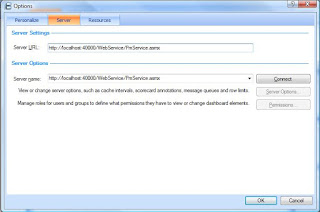
Replace localhost:4000 with your server name and click ok.
Then you can click on Refresh to get all the contenct on your designer.
Hope it helps.
Regards,
Mostafa arafa
I was getting an error message when i'm trying to connect to Performance point server, and the error message wasn't descriptive at all, this is the error message :
" ERROR SUMMARY Below is a summary of the errors, details of these errors are listed later in the log. * Activation of http://ServerName/DesignerInstall/ resulted in exception. Following failure messages were detected: + Access is denied. (Exception from HRESULT: 0x80070005 (E_ACCESSDENIED))
COMPONENT STORE TRANSACTION FAILURE SUMMARY No transaction error was detected.
"
If you don't have performance point server on your machine and you are not able to download it below shows how can you do this.
To do this, get the download from your server, this is the path:
C:\Program Files\Microsoft Office PerformancePoint Server\3.0\Monitoring\DesignerInstall
Take 3.0 folder, and install the designer on your desktop.
After installation, you will have another problem, you can't connect to your server because you didn't install it from the browser, to fix this do the following:


Replace localhost:4000 with your server name and click ok.
Then you can click on Refresh to get all the contenct on your designer.
Hope it helps.
Regards,
Mostafa arafa
Thursday, July 30, 2009
Learn how to build interactive WCM portal in sharepoint
Hi folks,
Excellent video by Technology Director of Razorfish, he shows how can you build interactive content management portal in sharepoint using jQuery,Ajax,Silverlight and flash ?
The video also shows how to enable RIA features/Web 2.0 in your sharepoint enterprise portal using flash and silverlight and social networking.
The video is full of best practices and initiative ideas.....
Enjoy watching this video:
http://videos.visitmix.com/MIX09/C19F
-- Mostafa Elzoghbi
Excellent video by Technology Director of Razorfish, he shows how can you build interactive content management portal in sharepoint using jQuery,Ajax,Silverlight and flash ?
The video also shows how to enable RIA features/Web 2.0 in your sharepoint enterprise portal using flash and silverlight and social networking.
The video is full of best practices and initiative ideas.....
Enjoy watching this video:
http://videos.visitmix.com/MIX09/C19F
-- Mostafa Elzoghbi
Thursday, July 23, 2009
Send Email activity is not working problem
Hi all,
I went through a problem in Sending Email using Email activity in SharePoint, it doesn't work when you try to send email to specific email format using sharepoint designer 2007.
To read more about the problem and the workaround that i developed, check below url :
https://connect.microsoft.com/feedback/ViewFeedback.aspx?FeedbackID=474381&SiteID=470&wa=wsignin1.0
Hope this helps.
Regards,
Mostafa arafa
I went through a problem in Sending Email using Email activity in SharePoint, it doesn't work when you try to send email to specific email format using sharepoint designer 2007.
To read more about the problem and the workaround that i developed, check below url :
https://connect.microsoft.com/feedback/ViewFeedback.aspx?FeedbackID=474381&SiteID=470&wa=wsignin1.0
Hope this helps.
Regards,
Mostafa arafa
Monday, July 20, 2009
How to control which Silverlight version does your application run on ?
Hi Folks,
I have been asked from one of my colleagues that he developed a Silverlight 2.0 and he doesn't want to upgrade his application to Silverlight 3.0.
- minRuntimeVersion: used to control the version of the Silverlight that your application will run on at minimum.
For example: if you built your application on version 2.0, the client will not be prompted to install version 3.0 when visiting your website if he has version 2.0 and this attribute is set to use version 3.0.
autoUpgrade: when it is true, the application will be upgraded to the newest Silverlight version automatically. If it is false, noting will happen.
Some use cases for different situation:
- - Before shipping your application make sure that make autoUpgrade to false, unless you developed some features which requires the client to upgrade his Silverlight version to the newest one.
- - Set the value of minRuntimeVersion to the version you test your application on, and make sure this is the minimum version you want to make your application is running with no issues.
Mostafa arafa
Tuesday, July 14, 2009
Get to know SharePoint 2010
Hi all,
Interested to know more about next version of sharpeoint, here is the site that gives you good information about the new features of Sharepoint 2010 features...check it out.
http://sharepoint.microsoft.com/2010/Sneak_Peek/
Hope this helps.
Regards,
Mostafa arafa
Interested to know more about next version of sharpeoint, here is the site that gives you good information about the new features of Sharepoint 2010 features...check it out.
http://sharepoint.microsoft.com/2010/Sneak_Peek/
Hope this helps.
Regards,
Mostafa arafa
Wednesday, July 01, 2009
MVP 2009 Award - 4th Year
Hi All,
Today i have been awarded as a C# MVP for the forth time, I got an email from Microsoft saying:
"
Dear Moustafa El-Zoughby,
Congratulations! We are pleased to present you with the 2009 Microsoft® MVP Award! This award is given to exceptional technical community leaders who actively share their high quality, real world expertise with others. We appreciate your outstanding contributions in Visual C# technical communities during the past year."
Thanks a lot all for your continous support.
Wait me for new challenges this year and so on.
Regards,
Mostafa arafa
Today i have been awarded as a C# MVP for the forth time, I got an email from Microsoft saying:
"
Dear Moustafa El-Zoughby,
Congratulations! We are pleased to present you with the 2009 Microsoft® MVP Award! This award is given to exceptional technical community leaders who actively share their high quality, real world expertise with others. We appreciate your outstanding contributions in Visual C# technical communities during the past year."
Thanks a lot all for your continous support.
Wait me for new challenges this year and so on.
Regards,
Mostafa arafa
Monday, June 29, 2009
Get started with jQuery library from its own creators !!!
Hi Folks,
As you know, MS announced that jQuery is a built-in library in VS 2008 SP1 for ASP.NET Developers.
I recommend for all developers, to see the series of jQuery Library videos from its own creator : John Resig and his team, this series of videos help you to understand the jQuery library features,jQuery UI and other important notes for advanced developers.
I enjoyed watching these series, and i suggest all of you to understand and start using jQuery library in your .NET Projects and solutions.
After you finish this series, i like to share with you these posts for integrating ASP.NET with jQuery library:
1) ASP.NET with jQuery: Scott hanselman:
http://www.hanselman.com/blog/jQuerytoshipwithASPNETMVCandVisualStudio.aspx
2) ASP.NET with jQuery:
http://dotnetslackers.com/articles/ajax/Using-jQuery-with-ASP-NET.aspx
Hope this helps.
Regards,
Mostafa arafa
As you know, MS announced that jQuery is a built-in library in VS 2008 SP1 for ASP.NET Developers.
I recommend for all developers, to see the series of jQuery Library videos from its own creator : John Resig and his team, this series of videos help you to understand the jQuery library features,jQuery UI and other important notes for advanced developers.
I enjoyed watching these series, and i suggest all of you to understand and start using jQuery library in your .NET Projects and solutions.
After you finish this series, i like to share with you these posts for integrating ASP.NET with jQuery library:
1) ASP.NET with jQuery: Scott hanselman:
http://www.hanselman.com/blog/jQuerytoshipwithASPNETMVCandVisualStudio.aspx
2) ASP.NET with jQuery:
http://dotnetslackers.com/articles/ajax/Using-jQuery-with-ASP-NET.aspx
Hope this helps.
Regards,
Mostafa arafa
Sunday, June 28, 2009
C# Visual Developer Center website
Hi all,
I'd like to share with you this website: C# Developer Center, This is a good site it contains all C# language enhancements, C# MVP Blogs, C# highlights, C# Community blogs and more.
This website you can subscribe for RSS and check it frequently.
** link:
http://msdn.microsoft.com/en-us/vcsharp/default.aspx
Regards,
Mostafa arafa
I'd like to share with you this website: C# Developer Center, This is a good site it contains all C# language enhancements, C# MVP Blogs, C# highlights, C# Community blogs and more.
This website you can subscribe for RSS and check it frequently.
** link:
http://msdn.microsoft.com/en-us/vcsharp/default.aspx
Regards,
Mostafa arafa
Sunday, June 21, 2009
How to develop out-of-browser applications ?
Hi Geeks,
A question needs an answer for most of web developers these days : Can we develop a web application and this application can run out of the browser ? The answer is YES, You can do that.
But How ? Use Silvelight 3.0 Beta.
One of the interesting features in Silverlight 3.0 is that you can detch your application from the web browser and this browser can work as a desktop application.
Silverlight 3.0 Beta have other interesting features such as: checking network availability,storing data offline and much more.
If you have no experience with silverlight 2.0 or earlier, this is the site you want to get started with :
http://silverlight.net/getstarted/silverlight3/default.aspx
This site is a good reference for all Silverlight 3.0 Features and samples.
Hope this helps.
Regards,
Mostafa arafa
A question needs an answer for most of web developers these days : Can we develop a web application and this application can run out of the browser ? The answer is YES, You can do that.
But How ? Use Silvelight 3.0 Beta.
One of the interesting features in Silverlight 3.0 is that you can detch your application from the web browser and this browser can work as a desktop application.
Silverlight 3.0 Beta have other interesting features such as: checking network availability,storing data offline and much more.
If you have no experience with silverlight 2.0 or earlier, this is the site you want to get started with :
http://silverlight.net/getstarted/silverlight3/default.aspx
This site is a good reference for all Silverlight 3.0 Features and samples.
Hope this helps.
Regards,
Mostafa arafa
Subscribe to:
Posts (Atom)